Colorize Black and White Photos with AI
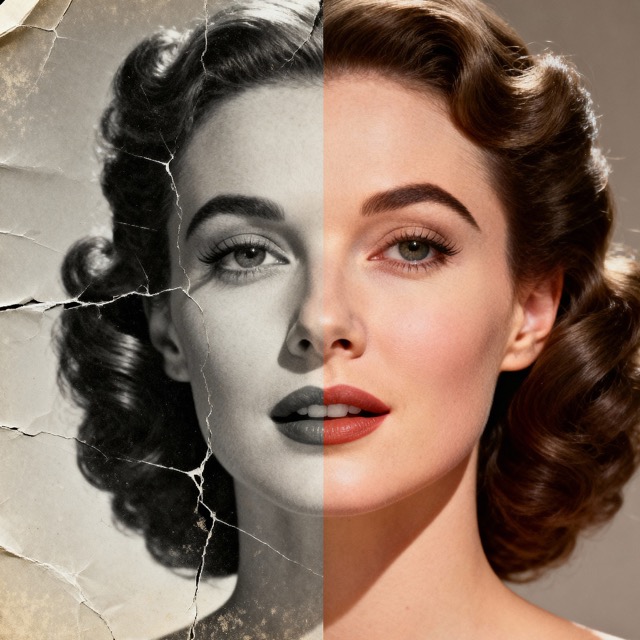
Nostalgia AI turns old black and white photos into full-color pictures in a few seconds. The AI looks at faces, clothing, skies and surroundings and fills in natural colors, so a grandparent's portrait or a family snapshot from decades ago looks like it was taken yesterday.


On a computer? Try it in your browser
How it works
Upload your photo
Pick a black and white photo from your camera roll, or take a picture of a printed one with your phone.
Tap Colorize
The AI analyzes the scene and adds color to skin, hair, clothes and background.
Save and share
Download the colorized photo, share it with family, or go one step further and animate it.
Why Nostalgia AI
Natural-looking color
Skin tones and everyday objects get believable colors rather than a flat sepia wash.
Colorize and restore together
Scratches, tears and fading can be repaired in the same pass, so you do not need a second app.
Help the AI with details
Know that your grandmother wore a red dress? You can add an optional hint, like the color of a faded shirt or someone's hair, to guide the result.
Frequently asked questions
How do I colorize a black and white photo?
Open Nostalgia AI on iPhone, Android or the web, upload your photo and choose Colorize. The result is ready in seconds.
Will the colors be historically accurate?
The AI predicts the most likely colors from what it sees, so results are realistic but not guaranteed to match the original. If you remember a specific color, you can add it as a hint.
Can I colorize a photo of a printed picture?
Yes. Photograph or scan the print in good light, without glare, and upload it. A flatter, sharper scan gives better results.
Can it fix damage as well?
Yes. Nostalgia AI can also remove scratches and tears, reduce fading and sharpen faces.
Guides
More you can do
Ready to try it on your own photos?