Restore Old Photos with an AI Photo Restoration App
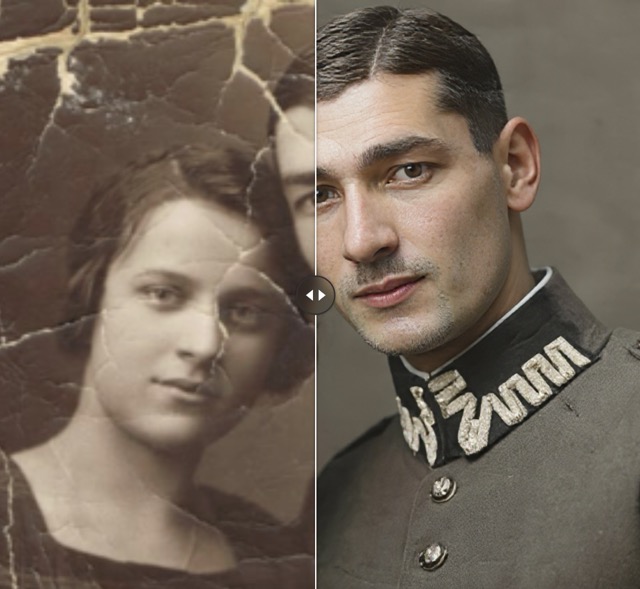
Want to restore old photos without learning Photoshop? Nostalgia AI is a photo restoration app that repairs old family photos in one tap. It removes scratches and tears, fixes fading and discoloration, sharpens blurry faces and can colorize black and white shots.
On a computer? Try it in your browser
How it works
Add your old photo
Upload a scan, or photograph a print with your phone.
Tap Restore
The AI repairs damage, sharpens detail and cleans up the image.
Colorize or animate
Optionally add color, or bring the faces to life as a short video.
Why Nostalgia AI
Scratches, tears and creases
Physical damage from decades in a shoebox is repaired automatically.
Face restoration
Blurry or low-resolution faces are sharpened so people are recognizable again.
On your phone or the web
Use the iPhone or Android app, or restore photos from your computer in the browser.
Frequently asked questions
How do I restore old photos?
Scan the photo or take a clear picture of the print, add it to Nostalgia AI and tap Restore. The AI repairs scratches, tears and fading and sharpens faces. You can then colorize it or animate it, and your original stays untouched.
What does a photo restoration app do?
It uses AI to repair damage in old photos, such as scratches, tears, stains, fading and blur, and can add color to black and white images.
Is the AI replacing the original photo?
No. You get a new restored image and your original stays untouched.
Does it work on very damaged photos?
It handles most everyday damage well. Heavily torn or missing areas are reconstructed by the AI, so check the result against your memory of the photo.
What should I look for in an app to restore old photos?
Look for repair of scratches, tears and fading, sharper faces, and a way to compare the result with your original. Nostalgia AI does all of these, and can also colorize and animate the restored photo.
Which devices are supported?
iPhone, Android and any desktop web browser.
Guides
More you can do
Ready to try it on your own photos?